



Updated 4 October 2026.
DigiStreet field guide
SEO Audit Checklist You Can Run in an Afternoon
An afternoon audit should find the small number of faults that change the next week of work. It is not a race to export the largest crawl spreadsheet.
Set a four-hour limit and choose one commercial section of the site. Save the exact URLs, Search Console filters and screenshots you inspect. The output is a short action ledger with owner and consequence, not a score out of one hundred.
Google’s developer guidance begins with making links crawlable and helping Google discover updated pages. Its Search Console guidance separates search performance from what happens after the click. Use those boundaries to organise the afternoon: discovery, indexing, page meaning, internal paths and post-click action.
You can run this with Search Console, Analytics, a browser and any crawler you already trust. The crawler supplies leads. The browser and first-party reports tell you whether the lead matters.
Use this guide as a working document: keep the URL, date, owner and source beside every decision.
The working view
| Time box | Check | Output |
|---|---|---|
| 0–30 minutes | Scope, dates and page groups | Audit sheet with exact filters |
| 30–90 minutes | Indexing and crawl path | Blocked, duplicate or orphan URLs |
| 90–150 minutes | Titles, headings and page intent | Priority page rewrites |
| 150–210 minutes | Internal links and templates | Template-level fixes |
| 210–240 minutes | Measurement and action ledger | Owner, consequence and next check |
Four hours, ten checks, one action ledger
Freeze the scope before opening tools
Pick one service, category or product family and write the canonical URLs. Record the Search Console period and comparison. A small fixed scope stops the audit drifting into every old warning on the domain.
Check what Google has indexed
Use Search Console’s page inspection and indexing reports for the priority URLs. Note canonical selection, last crawl and any exclusion reason. Check the rendered page when important text or links depend on scripts.
Follow the crawl path yourself
Start at the homepage or relevant hub and click to the target page. The link should be an HTML link with useful anchor text. If the route is hidden inside search, filters or a script-only control, discovery and context are weaker.
Compare title, heading and intent
Read the search query, title element, visible main heading and opening paragraph together. They should point to the same job. Google may build title links from several prominent signals, so conflicting labels create avoidable ambiguity.
Inspect the snippet source
Look for a concise passage that answers the query and a meta description that accurately summarises the page. Google can draw snippets from page content. Do not stuff variants into the description; give the page a clear answer instead.
Find template faults before page faults
A repeated missing heading, thin category introduction or broken breadcrumb can affect hundreds of URLs. Group issues by template and confirm them on several pages. One template repair can outrank dozens of isolated edits.
Open the internal-link neighbourhood
List the pages linking in and the useful destinations linking out. Check whether anchors explain the relationship. Add links where the reader genuinely needs the next detail, especially between a guide, commercial page and relevant case study.
Read Search Console by page group
Compare clicks, impressions, queries and average position for the scoped URLs. Look for pages with impressions and weak clicks, query clusters landing on the wrong page, and losses confined to one template or market.
Test the conversion path
Open the page on a phone, use the form, check the confirmation and confirm the lead action appears in Analytics as the intended key event. Search growth that ends at a broken form is a site fault, not a reporting success.
Write actions with consequence
Each row should name the URL or template, evidence, consequence, action, owner and next check. Sort by blocked discovery, wrong page selection, weak answer and measurement failure. Leave low-value cosmetic warnings out of the first week.
Turn findings into next-week work
Limit the first action list to five rows. Put the biggest discovery or indexing fault first, then the page-selection issue, then the answer or conversion fault with the clearest evidence. A long undifferentiated list makes urgent work compete with harmless warnings.
For every template issue, name three example URLs and the expected rule. Developers need to know whether the repair affects all product pages, one category type or a small exception. Test the repaired template on those examples before assuming the whole site changed.
For every content issue, quote the search intent and the missing answer. “Page is thin” tells an editor little. “The page names the service but never states the deliverable, market or proof requested by the query group” creates a brief that can be reviewed.
For every measurement issue, keep a test record. Record the browser action, event name, success state and destination system. If the form reaches the inbox but not Analytics, or Analytics fires twice, the row should describe that exact break.
Book the recheck while writing the action. Some fixes can be tested immediately; search evidence needs a later date and consistent filters. An audit without a recheck becomes a document. An audit with owners and dates becomes work.
Reading the results of an afternoon audit
The ten minute test that shows whether the audit is worth finishing
Before the full four hours, spend ten minutes on the scoped section. Search for the page's main phrase in a browser, click the result and try to reach a form. If the page does not appear, you have an indexing or relevance problem. If it appears but the form is hard to find, you have a page problem. If the form works, carry on. Most afternoons are wasted on tidy technical checks while the real fault sits in these first ten minutes. Write down what you saw before opening any tool. That note becomes the first row of the action ledger.
A worked example of reading one page group
For example, a service section has twenty URLs. Search Console shows twelve of them indexed, six excluded as duplicates and two never discovered. Those are three different faults with three different owners. The duplicates point to a canonical rule. The undiscovered pages point to missing links. Only the indexed twelve are worth rewriting. Without that split, a team may rewrite pages Google has not even chosen to show. The counts here are round figures chosen to show the sorting, not a measurement. Write the same three-way split for your own section and the work for the week usually becomes obvious. Never rewrite a page before you know which group it belongs to.
Mistakes that waste the afternoon
The common mistake is treating every red mark equally. A missing alt attribute on a decorative icon sits in the same report as a service page blocked by a stray noindex tag. Another is auditing as the site looks to you, signed in and on a fast office connection, rather than as a first-time visitor on a mid-range phone. A third is fixing a page and moving on without saving the before state, which leaves no way to tell whether the change helped. Take a screenshot of the report and the page before touching anything, and name the file with the date. Pick the fix that unblocks the most pages first.
What to ask an agency that offers a free audit
Ask which URLs they will inspect and which they will leave out. Ask whether the output is a ranked list of actions or a raw tool export. Ask who will run the fixes and how soon the first recheck is booked. A useful audit comes with a sample row showing evidence, consequence and owner. Where the free audit leads to a paid plan, ask to see the tier before you read the findings, so the findings are not shaped to fit it. SEO Starter, for reference, is 50,000 plus GST a month. Ask for a recheck date in writing.
Evidence from DigiStreet work
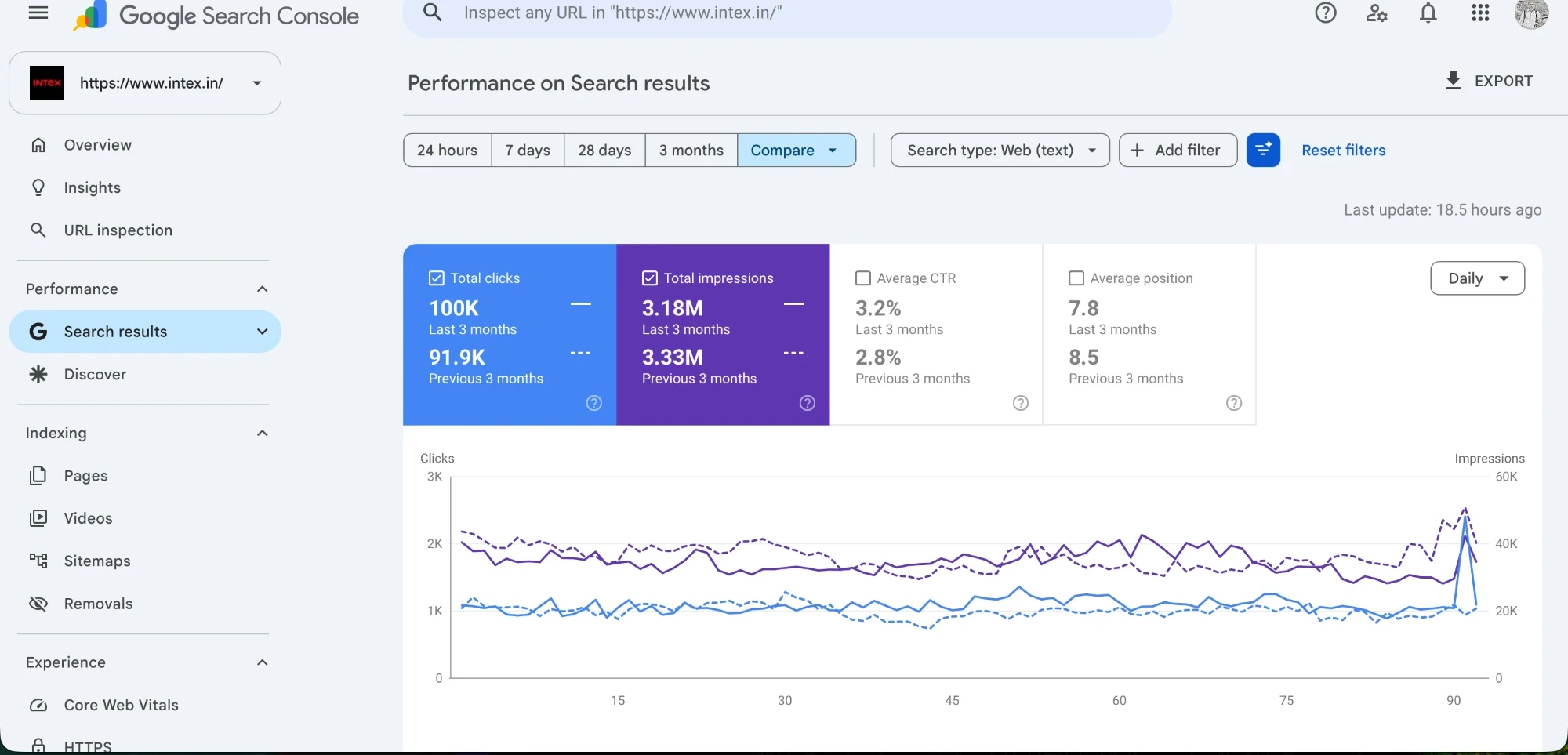
The Intex chart is the sort of first-party evidence an audit should preserve before changes are made. Capture the same period and filters after the priority fixes. That turns the audit into a test instead of a static diagnosis.
Stop at four hours. If the action ledger is empty, the scope was too broad or the audit stayed inside tools. Open the actual pages and follow the buyer’s path.
Questions people ask before using this guide
Can I audit a large site in one afternoon?
Audit one commercial section and its templates. A whole large site needs a separate scope.
Which tool should I open first?
Start with the URL list and business page group, then use Search Console and a browser.
Should I fix every crawler warning?
No. Prioritise faults that block discovery, confuse page selection, weaken the answer or break measurement.
What belongs in the final audit sheet?
URL or template, evidence, consequence, action, owner and the date of the next check.
How do I check a traffic drop?
Compare equal periods, then narrow by search type, page group, query, country and device.
Where can DigiStreet audit the site?
Use RankStreet for the audit route or ask for a free SEO audit through the contact page.
References
Put the next decision on one page
Bring the URL, the evidence you already have and the business action that matters. We will tell you what should be checked first.