




You pay for a click on an ad that says “Free kitchen design consultation in Pune.” The visitor lands on your homepage. The page shows a slider, an About section, six services and a menu with eleven links. The visitor looks for the consultation form, cannot find it and leaves. The ad worked, but the page failed. The choice of landing page vs homepage for ads decides whether your click money turns into enquiries.
This guide explains when a dedicated landing page beats the homepage, what the page needs and how to test the difference with your own traffic.
The Core Difference
| Feature | Homepage | Landing page |
|---|---|---|
| Purpose | Introduce the brand to many types of visitors | Convince one type of visitor to take one action |
| Navigation | Full menu | Minimal or none |
| Message | Broad | Matches the ad closely |
| Calls to action | Several | One main action |
| Best traffic | Brand searches, direct visits | Paid ads, email, social campaigns |
A homepage has to serve everyone, so it serves no single visitor perfectly. A landing page serves one promise and one next step.
Why Message Match Matters

When a person clicks an ad, they expect the page to continue the same conversation. If the ad promises “GST registration in 3 days,” the page should open with that promise, in nearly the same words. A mismatch makes visitors doubt they landed in the right place.
Message match also affects ad cost on some platforms. Google Ads considers landing page experience as part of Quality Score, which influences how much you pay and where your ad appears. A relevant, fast, clear page helps.
Match the Page to the Traffic Source
Different channels bring different visitors, so the best page may differ too.
| Source | Visitor mindset | Page that fits |
|---|---|---|
| Google Search ads | Actively looking for a solution | Focused service page with form and proof |
| Meta or Instagram ads | Browsing, not yet searching | Short, visual page with one clear offer |
| LinkedIn ads | Professional, comparing options | Page with credibility, case study and a lead magnet |
| Email campaigns | Already know you | Page that continues the email’s offer |
| Retargeting ads | Visited before, did not enquire | Page that answers the doubts that stopped them |
Searchers on Google already want the service, so they need reassurance and a quick path to act. Social visitors may need more persuasion, because they did not start with a need.
When a Landing Page Is the Better Choice
- You run ads for a specific service, offer or event
- You target different audiences with different messages
- You want to measure one clear action, such as a form submit or call
- Your homepage covers many services and distracts visitors
- You test several offers
When the Homepage Can Work
- Your business has one simple offer, and the homepage already explains it well
- You run brand search ads for people who already know you
- You are in early stages and cannot yet build separate pages
- The homepage is already clean, fast and focused on enquiries
Even then, a service page that matches the ad often beats the homepage.
What About Service Pages?
A service page sits between the two. A well-built service page can act as a landing page when it has a clear promise, proof and a form. Many businesses use their best service pages for ads and keep a separate, stripped-down version for campaigns. Our Meta ads vs Google ads for lead generation guide shows how the two platforms send different traffic, which affects the page you need.
What a Lead-Focused Landing Page Needs
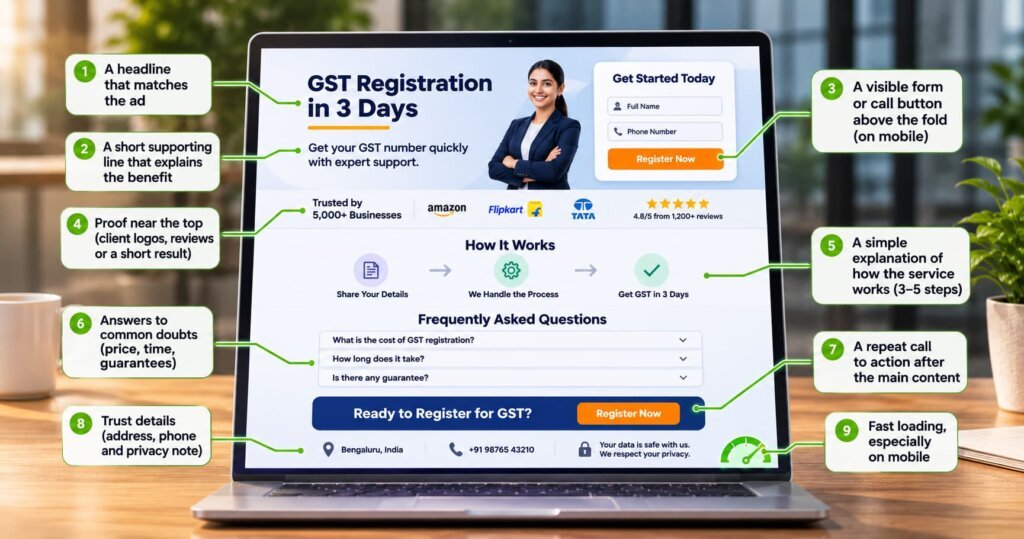
Work through these parts in order.
- A headline that matches the ad. State the offer and who it serves.
- A short supporting line that explains the benefit.
- A visible form or call button above the fold on mobile.
- Proof near the top, such as client logos, reviews or a short result.
- A simple explanation of how the service works, in three to five steps.
- Answers to common doubts, such as price range, time and guarantees.
- A repeat call to action after the main content.
- Trust details, such as address, phone and privacy note.
- Fast loading, especially on mobile. See our guide on Core Web Vitals for business websites.
Form Design for More Enquiries
Forms are where many pages lose leads.
- Ask only what you need, such as name, phone and one qualifying question
- Use clear labels and a plain button text, such as “Get my free quote”
- Show what happens after submission
- Add a click-to-call or WhatsApp option for people who dislike forms
- Test on a real phone
- Make sure the thank-you page triggers conversion tracking
More fields can raise lead quality but lower lead count. Choose the balance that fits your sales team’s capacity.
Mobile First
Most ad clicks in India come from phones, so design the mobile view first. Keep the headline short, make buttons large enough to tap, place the form or call button high on the page and avoid pop-ups that cover the content. Use compressed images, and test the page on a mid-range phone over a normal mobile network. A page that looks good on a large screen can still fail on a small one.
Navigation: Remove or Reduce?
Most landing pages remove the main menu so visitors stay focused. Keep a logo and a contact link. If your audience needs to check your credibility, add a link to a short About section on the same page, rather than sending them to a long site tour.
SEO Considerations
Landing pages built only for ads can create duplicate or thin content if search engines index them. Decide whether each page should appear in search. If it should not, add a noindex tag. If you want it to rank, make it a proper service page with unique content. Avoid copying text across many near-identical pages. Our guide on keyword cannibalisation explains the risk.
How to Test Landing Page vs Homepage for Ads
- Pick one campaign with steady traffic.
- Create a matching landing page.
- Split traffic evenly, using your ad platform’s experiment tools or a testing tool.
- Run the test until you have enough conversions to compare, not just clicks.
- Measure enquiries and cost per qualified lead, not only form fills.
- Keep the winner, and test the next change.
Small tests with few conversions can mislead, so give them time. Our guide to cost per lead vs cost per qualified lead shows how to judge the result.
Speed, Trust and Clarity: A Quick Checklist

Before you launch any ad page, read it once as a stranger:
- Can I tell what this page offers within five seconds?
- Do I see proof that the business is real?
- Do I know what happens after I submit the form?
- Does the page load quickly on my phone?
- Is there a phone number or WhatsApp link for quick questions?
If the answer to any is no, fix that first, before you spend more on ads.
A Hypothetical Example
We made up this example for illustration. A Noida CA firm sends Google Ads traffic for “company registration” to its homepage. The page lists tax, audit, payroll and legal services. The firm builds a landing page with a headline that matches the ad, three steps, a price range, two client reviews and a short form. It splits traffic for several weeks. The team then compares qualified enquiries, not just submissions, and keeps the page that brings better leads.
Common Mistakes
- Sending all ads to the homepage
- Using one landing page for every ad
- Adding too many links
- Hiding the form
- Making the page slow
- Forgetting mobile visitors
- Not tracking the thank-you page
- Declaring a winner too early
Build Pages That Turn Clicks Into Enquiries
If your ads bring clicks but few enquiries, the page is a good place to look first. Our website design team builds fast, focused pages, and our PPC team can set up testing. Contact DigiStreet Media to review your campaign pages.
Reference Links
| Relevant Topic or Resource | Why It Is Relevant | Verified Link |
|---|---|---|
| Google Ads Help: About Quality Score | Explains how landing page experience affects ad quality | https://support.google.com/google-ads/answer/6167118 |
| Google Ads Help: Landing page experience | Details what counts as a good landing page | https://support.google.com/google-ads/answer/7050591 |
| Google Search Central: Robots meta tag and noindex | How to keep pages out of search results | https://developers.google.com/search/docs/crawling-indexing/robots-meta-tag |
Frequently Asked Questions
What is the difference between a landing page and a homepage?
A homepage introduces the whole brand to many visitors. A landing page focuses on one offer and one action for visitors who arrive from a specific campaign.
Should I send ads to my homepage?
Usually not, unless the homepage already focuses on one offer or the traffic comes from brand searches. A matching landing page or service page often converts better.
What makes a good landing page for Google Ads?
A headline that matches the ad, a clear form or call button, proof, simple steps, answers to doubts, fast loading and conversion tracking.
Should a landing page have navigation?
Most landing pages remove the main menu to keep visitors focused, and keep a logo and a contact link.
Does landing page quality affect ad cost?
Google Ads includes landing page experience in Quality Score, which can affect ad position and cost per click.
How many form fields should a landing page have?
Ask only for what you need. Fewer fields usually bring more leads, and more fields can improve quality. Test with your own sales team.
Should I index my landing pages?
Index pages meant to rank, and noindex campaign-only pages that duplicate other content. Decide for each page.