



Published 24 October 2026.
On an author’s website, the writing is rarely the part that needs replacing. The presentation is. When we redesigned the site of Pittsburgh author Stan Popovich, we kept every word of his 15 pages and 56 articles and changed almost everything around them: the order of the homepage, how the book is shown, where the proof sits, how articles read on a phone, and how much code a browser has to load before any of it appears.
This post goes through those decisions one by one, so you can use them on your own site. They apply to any site built on one person’s name and a long back catalogue: authors, coaches, speakers, consultants, doctors who write. The full before-and-after screens are in our Managing Fear website redesign case study, and the new site is live at bookbystanley.com.
Start by keeping the content and mapping every old address
A redesign that throws away old articles throws away the pages people already find. Stan’s site held 56 articles written over years, on fear, worry, grief, panic attacks, work stress and more. All 56 moved into the new design with their wording intact, along with the 15 site pages. That is 71 pages, and not one of them was cut.
New designs usually bring new addresses, and every old address needs somewhere to go. Google’s guidance for site moves is to map each old URL to its new URL and to use permanent server-side redirects, such as 301s [1]. On the Managing Fear site, each of the 69 old page addresses now has a 301 redirect to its new page.
Build that map before any design work starts. A spreadsheet with three columns is enough: the old URL, the new URL, and whether the page stays, merges into another or goes. It is the dullest document in the project and the one that protects the most.
Open with one promise and the thing you sell
The old Managing Fear homepage opened with four paragraphs and a stock photo. A visitor had to read before they understood what was on offer, and the book itself, the one thing Stan sells, had no cover anywhere on the page.
The new homepage opens with a single line: “Fear rarely has one fix. Here are 200+ ways to manage it.” Beside it sits the book in 3D, the price, and two buttons, one to buy the book and one to try a free 5-step framework. Everything below follows a plain order. First the problem, then the solution, then the proof.

On a personal-brand site, this order matters more than colour or type. People arrive worried, curious or sceptical. The first screen has to tell them they are in the right place and what to do next. The biography can wait until they want it, and on Stan’s new site it has its own page, opening with his portrait, his story in one line and his credentials.
The same rule applies to the page that sells. The old order page led with a long headline and an FAQ. The new one puts the 3D cover, the price and five ways to buy at the top, so the decision and the means to act on it sit in one place.
Put the proof where visitors can check it
A person’s site lives or dies on proof, and most personal sites bury it. Stan has a lot of it. His book has 400+ Amazon reviews, and he has appeared on 30+ US TV and radio programmes, including ABC, CBS, FOX and NBC stations. The old site listed the media appearances as text and showed 13 reviews.
The new site shows 28 reviews on the reviews page, filterable by counselors and readers. The media page turns the text lists into 19 TV and 27 radio appearance cards, plus 64 publications with links. The homepage carries the logos of ABC, CBS, FOX, NBC, MSN and iHeartRadio, alongside photos of Stan at work.
Two habits made this work. Every claim points to something a visitor can open, whether that is a review, a clip or an article. And the proof sits next to the decision it supports: reviews close to the book, media close to Stan’s story.
Design the phone layout first
Google uses the mobile version of a site’s content, crawled with its smartphone agent, for indexing and ranking [2]. So the phone layout is the version search engines judge, and for a personal site it is often the version most readers see too.
Stan’s old site was built for desktop. On a phone, every section collapsed into one long column, so a reader scrolled past paragraph after paragraph before reaching the book. The new layout uses two columns wherever the content fits, a sticky Get the Book bar, and swipeable rows for videos and topics. The promise and the book now sit in the first screen on a phone.
Our rule on content-heavy sites is to review every template at phone width before anyone looks at the desktop version. If something does not earn a place on the small screen, ask whether it needs to be on the large one.
Cut the code before you add anything new
The old homepage loaded 47 separate style and script files, 977 KB of them, on top of 312 KB of HTML. The new homepage loads 3 style and script files totalling 77 KB, and 54 KB of HTML. We measured both in the browser on 24 October 2026, without photos and videos, so the comparison is code against code.
For context, the HTTP Archive’s 2024 Web Almanac found that the median homepage loads 7 CSS files and 23 JavaScript files [3]. The old Managing Fear homepage was well above that. On the WordPress sites we audit, most of those files come from plugins and page-builder add-ons that load on every page, whether the page uses them or not.
Less code gives you room against Google’s Core Web Vitals targets: the largest content on screen should appear within 2.5 seconds, the page should respond to a tap in under 200 milliseconds, and its layout shift score should stay under 0.1 [4]. A lighter build is also cheaper to keep fast as the site grows, because each new page starts from 3 files, not 47.
Use motion to tell the story, and let people switch it off
We added three moments of motion to Stan’s homepage, each carrying part of the story. Three short, silent video loops show worry, panic and racing thoughts, so visitors see themselves before they read a word. Stan’s 5-step framework lights up one step at a time as you scroll, each with a real-life example. Further down, a frightened face wipes away to a laughing family, under the line “Fear may still show up. It doesn’t have to run your life.”
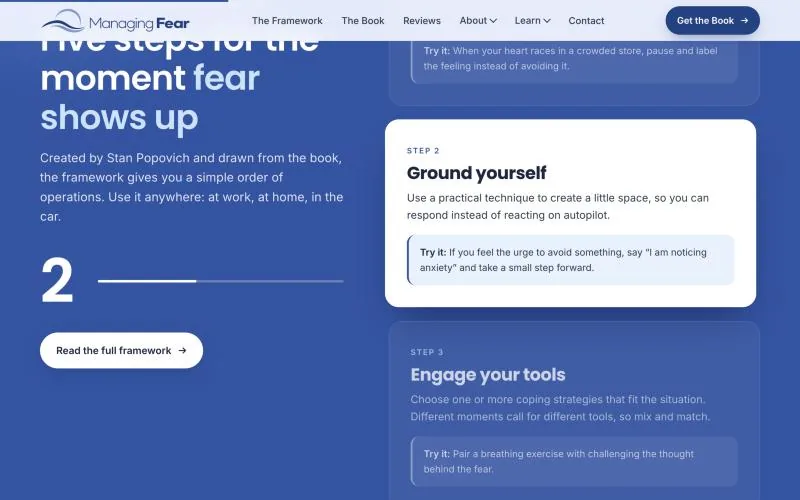
Motion has a cost for some people. The W3C notes that decorative movement can trigger vestibular reactions such as dizziness, nausea and headaches, and its accessibility guidance asks that motion triggered by interaction can be turned off, with the browser’s reduced-motion setting as one way to do it [5]. On the Managing Fear site, all of the motion switches off for visitors who have asked their device for less of it. For a site read by anxious people, we treated that as part of the design, not an extra.
Make long articles easier to read and easier to quote
Articles are where an author’s site earns most of its search visits, so they deserve the same care as the homepage. The old article template put a large photo beside a long sidebar of categories. Every article on the new site opens with a quick-answer box, has a table of contents that follows you down the page, and ends with related reads.
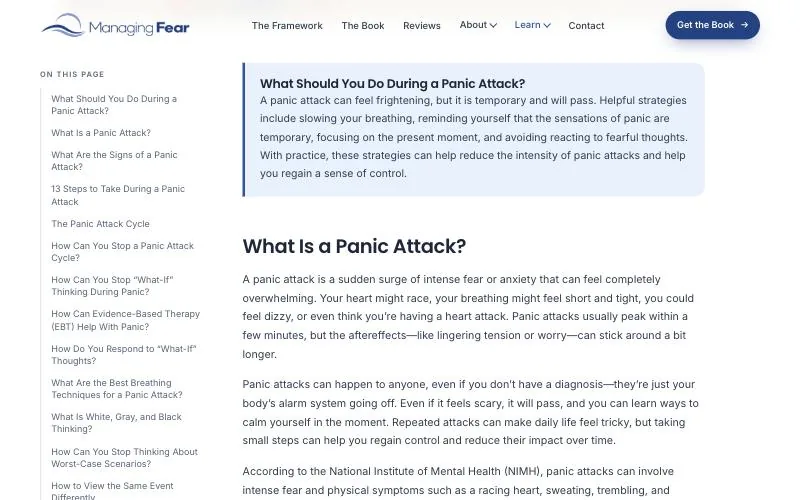
The quick answer helps two kinds of reader. A person in a hurry gets the point in a few lines. A search engine or AI assistant gets a clean, quotable summary near the top. Google says there are no extra requirements to appear in AI Overviews or AI Mode beyond being indexed and eligible for a snippet [6], which makes clear, well-structured pages the work that counts.
We also added structured data to every page: Book, FAQ, how-to, author and article markup. One change worth knowing if you are planning this yourself: Google stopped showing FAQ rich results in Search from 7 May 2026 [7]. We still add FAQ markup, because it labels questions and answers clearly for any system that reads the page, but it no longer adds a dropdown to Google results.
What to change and what to keep
This is the checklist we now use on author and personal-brand redesigns, with what it meant on Stan Popovich’s site.
| Part of the site | Keep | Change | On the Managing Fear site |
|---|---|---|---|
| Articles and pages | Every page people find and read, word for word | The template around them | All 15 pages and 56 articles moved, 71 in total |
| Old addresses | Every old URL, as a redirect | The URL structure, if it is messy | 69 old addresses with 301 redirects |
| Homepage | The core promise | The order: problem, solution, proof | One promise, the book and two buttons on the first screen |
| Offer page | Prices and buying options | What appears first | 3D cover, price and five ways to buy at the top |
| Proof | Every real review and appearance | How it is shown and filtered | 13 reviews became 28; 19 TV, 27 radio and 64 publications shown |
| Phone layout | All the content | Columns, sticky actions, swipeable rows | Two columns where content fits and a sticky Get the Book bar |
| Code | Only what each page uses | Plugin and builder files loaded everywhere | 47 style and script files cut to 3 on the homepage |
| Brand | The colour people already know | Type, logo, spacing | Stan’s own blue (#2C5EAD), Poppins and Inter, a new wave-and-sun logo |
| Motion | Nothing that slows reading | Add motion only where it tells the story | Three homepage moments, all off under reduced-motion settings |
| Article pages | The writer’s voice | Quick answer, table of contents, related reads | Added to every article |
What a redesign like this costs and how long it takes
In India, our websites start at ₹1,00,000 plus GST for a CMS site with the core pages, a contact path and a handover. B2B websites start at ₹1,75,000 and corporate websites at ₹2,25,000, each plus GST. The full breakdown is in our website design cost guide and on our website development page.
For clients in the USA, websites start at $1,450, priced in US dollars with no GST. Stan is in Pittsburgh, Pennsylvania, and we designed and built his site from India; our web design page for US businesses sets out how that works across the time difference.
Most websites take us 14 to 30 days. A complex project takes about two months. On a content-heavy redesign, the number that moves the price and the timeline most is how many pages have to be moved, checked and redirected, so bring that count to the first conversation.
If your site has years of good writing and a design that hides it, send us the address. We will tell you what to keep, what to move and what the new homepage should lead with.
Frequently Asked Questions
What should an author website redesign change first?
The homepage order. Lead with one clear promise, the book or offer, and a single next step, then move the biography further down. On Stan Popovich’s site the first screen now holds one line, the book cover, the price and two buttons.
Should I delete old blog posts when I redesign my website?
No, not by default. Keep the posts people find and read, move them into the new design, and set a 301 redirect for every address that changes. We moved all 56 of Stan Popovich’s articles without cutting any.
Do I have to change my URLs in a redesign?
Only if the old structure is messy. If you do change them, map each old URL to its new one and use permanent server-side redirects, as Google’s site-move guidance recommends. The Managing Fear site has 69 such redirects.
How much does an author website redesign cost?
Our websites start at ₹1,00,000 plus GST in India and at $1,450 for US clients, with no GST. The final price depends on the number of pages to move, the features and how much content needs work.
How long does a website redesign take?
Most websites take us 14 to 30 days. A complex project takes about two months, and a large article library adds time for moving, checking and redirecting pages.
Is animation a bad idea on a personal-brand website?
No, if each piece of motion tells part of the story and all of it switches off for visitors whose devices ask for reduced motion. On the Managing Fear site, three homepage moments carry the story of recognising fear and seeing life beyond it.
Can an agency in India redesign a website for a US author?
Yes. DigiStreet Media designed and built the new website for Stan Popovich, an author based in Pittsburgh, from India. The before-and-after screens are in our Managing Fear website redesign case study.
References
- Site moves with URL changes, Google Search Central, last updated 20 August 2026.
- Mobile-first indexing best practices, Google Search Central, last updated 10 December 2025.
- Page Weight, Web Almanac 2024, HTTP Archive, Dave Smart and Jamie Indigo, 30 December 2024.
- Understanding Core Web Vitals and Google search results, Google Search Central, last updated 10 December 2025.
- Understanding Success Criterion 2.3.3: Animation from Interactions, W3C, WCAG 2.2.
- AI features and your website, Google Search Central, last updated 10 December 2025.
- Latest documentation updates, Google Search Central, entries of 8 May 2026 and 15 June 2026 on the FAQ rich result.
- Managing Fear website redesign case study, DigiStreet Media, October 2026.