

The events a mobile app should send to GA4 and Firebase
Updated 27 October 2026.
A GA4 property that records installs and sessions and nothing else is common. On an assessment app we audited, 711 recorded key events in 28 days were installs and session starts. Here are the 25 events we wrote into the tracking plan, what each one fires on, and which six are key events.
What an app tracking plan has to answer
A GA4 property can tell you that 293 people used an app in 28 days and still not tell you whether one of them finished anything. That was the state of an assessment app on Android and iOS when we audited it on 6 October 2026. Installs and sessions were recorded. Sign-up, login, assessment start, report, booking and purchase were not.
So the first question is not which SDK to install. It is which decisions you want to make. Ours were short. Does the ad campaign bring people who register. Do people who register finish a test. Do people who finish a test book or pay. None of those can be answered by an install count.
Write the questions down before you write the event names. Everything else follows from them, and we do the same thing on every mobile app build before a single screen is designed.
The 25 events, grouped by what they measure
Twenty five events covered the whole app. That is not many. Firebase lets an app log up to 500 distinct event types, so the limit was never the constraint. The constraint was keeping the list short enough that everyone on the team could name it from memory.
The grouping matters more than the count. Registration events exist to separate the three ways a sign-up fails. Assessment events exist to show where a long test loses people. Commerce events exist because revenue read $0 in that property, for the simple reason that purchase had never been sent. Here is the plan as we handed it to the developers on 8 October 2026.
| Area | Events | When they fire | Key parameters | Key event |
|---|---|---|---|---|
| Registration | sign_up_start, otp_requested, otp_verified, sign_up, sign_up_error, login | From the first tap on the sign-up form to a verified account, plus every return login | method, step, error_reason | sign_up and login |
| Profile | profile_complete | When a new user finishes the profile the app needs before it can show a result | user_type | No |
| Catalogue | view_item_list, select_item, view_item | When the test list loads, when one is tapped, when its detail screen opens | item_list_name, test_type, test_id | No |
| Assessment | test_start, test_progress, test_abandon, test_complete | On the first answer, at each quarter of the questions, on exit before the end, on submission | test_type, test_id, step | test_start and test_complete |
| Reports and sharing | report_view, report_download, report_share | When the result screen opens, when the PDF is saved, when it is shared out | test_id, method | No |
| Bookings | appointment_booked | When a slot with a practitioner is confirmed | practitioner_id, method | appointment_booked |
| Commerce | add_to_cart, begin_checkout, purchase, payment_failed | At each step of paid checkout, including the failures | value, currency, payment_method, error_reason | purchase |
| Engagement | screen_view, notification_open, consent_updated | On every screen change, on a push tap, when the consent choice changes | screen_name, screen_class | No |
The path from install to payment
first_open and session_start arrive free. Google collects both automatically in any app running the Firebase SDK, along with screen_view, user_engagement and, on Android, app_remove. That is where most properties stop, because stopping there takes no developer time at all.
Everything after the install needs code. Our chain runs first_open, session_start, sign_up_start when the form opens, otp_requested and otp_verified either side of the phone check, sign_up when the account exists, profile_complete when the profile is filled, view_item_list when the catalogue loads, select_item and view_item, test_start on the first answer, test_progress at each quarter, test_complete on submission, report_view on the result screen, then either appointment_booked or add_to_cart, begin_checkout and purchase.
Read that list as a drop-off chain. Each step can only lose people, never gain them, which is what makes it readable in a funnel exploration later.
Recommended names first, custom names second
Use Google’s recommended name wherever one exists. Google’s recommended events list includes login, sign_up, search, select_content, share and generate_lead for every property, and add_to_cart, begin_checkout, purchase, view_item, view_item_list and select_item for anything that sells. Google says to send them with their prescribed parameters to get the most details in your reports.
Eight of our 25 use names from that list, and screen_view is one Google collects on its own. The other 16 are ours, because nothing Google defines describes starting a psychometric assessment or confirming a session with a practitioner.
A custom name is not a failure. A custom name that duplicates a recommended one is. Send begin_purchase instead of begin_checkout and the ecommerce reports stay empty while you spend the next year building explorations to replace reports you could have had on day one. The same rule applies on a web application selling the same thing.
Sudhir Power
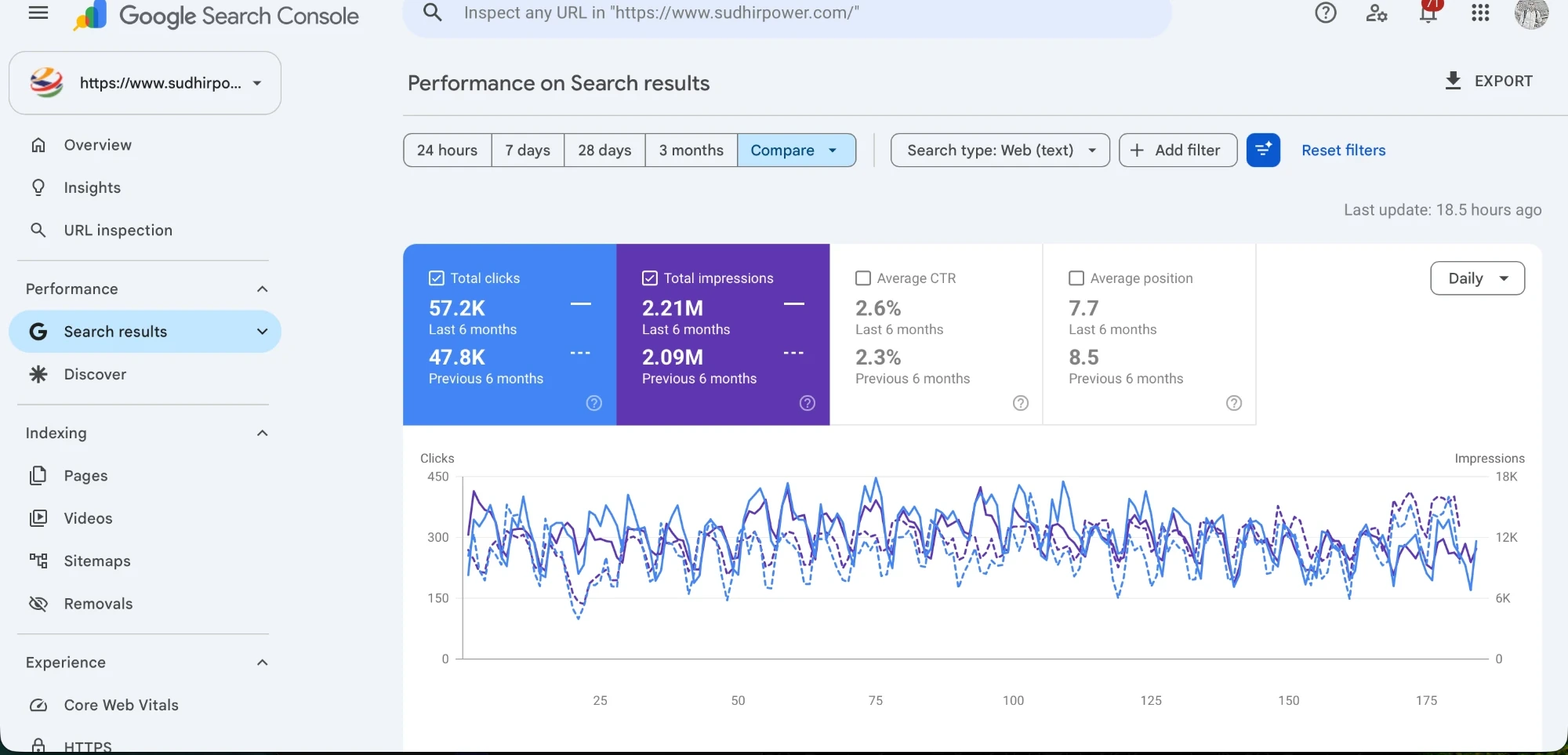
This is search evidence, not app analytics. Sudhir Power is an SEO client and the chart is six months of clicks and impressions from their Google Search Console property. We show it because the discipline is the one this post describes: get the measurement right, then read it. The app in this post belongs to a client we are not naming.
Parameters are where the answers live
An event name tells you something happened. A parameter tells you which thing. sign_up_error on its own is a number going up. sign_up_error carrying error_reason set to otp_timeout, otp_wrong, network or already_registered is a bug report with an owner.
We send method on sign_up and login (phone, Google or Apple), step on sign_up_error and test_abandon, test_type and test_id across the assessment chain, value, currency and payment_method on checkout, practitioner_id on bookings, and user_type on the first session after registration. Eight of those became registered custom dimensions. Parameters do not reach reports on their own, and Google’s order of steps is code first, a real session second, dimension third, then 24 to 48 hours before you can report on it.
What happens to screen names if you leave them alone
Every screen in this app was logged as MainActivity on Android or FlutterViewController on iOS. Those two values together were 42% of all screen views. Firebase logs a screen_view automatically on screen transitions and, when screen_class is not set, fills the value from the Activity or UIViewController in focus. In a Flutter app that is one class for the whole product.
So the screens report listed the container, not the content. There was no path through the app and no per-screen drop-off, on a product whose entire problem was drop-off.
The fix is a manual screen_view with a screen_name a person would recognise: signup, otp, consent, profile, test_list, test_detail, test_question, result, checkout. Firebase says to log it in onResume on Android and in viewDidAppear or onAppear on Apple platforms.
The order we ship them in
Registration first, then the assessment chain, then commerce, then the rest. The reason is bidding, not tidiness. The one app campaign driving about 98% of paid sessions had nothing to aim at except installs, so the earliest useful event is the first one that proves a person is real.
Our order was sign_up and login in release one, test_start and test_complete in release two, appointment_booked and purchase in release three, then reports, sharing, notifications and consent. Each release is about a working week on an app this size, and each one ends with a device check in DebugView.
If you are costing this, app work with us starts at ₹75,000 for a PWA, ₹1,49,999 for a Standard build and ₹2,29,999 for Advanced across iOS and Android, plus GST. Tracking of this size sits inside that as a few days of work, not a separate project. The digital marketing cost calculator covers the marketing side of the same budget.
Marking the six key events
Six events are marked as key events: sign_up, login, test_start, test_complete, appointment_booked and purchase. session_start and screen_view are not, and we removed them from the list we inherited.
GA4 allows 30 key events on a standard property and 50 on Analytics 360, so there is room, and the temptation is to mark everything. Do not. Fifteen key events give Google Ads fifteen things to chase and no priority. Six is already generous for one app.
If Analytics has already received an event you mark it with the star beside it in Admin, Data display, Events. An event that has not arrived yet can be marked ahead of time, and GA4 starts treating it as a key event once it is collected. Marking affects reports from that point and does not change historic data, so the date you mark is the date your conversion trend breaks.
The lines we do not cross on data
No assessment answers and no scores go to analytics. The event says test_complete with a test_type and a test_id, and what the person answered stays in the product database where it belongs.
Send an internal identifier as user_id. Not an email address, not a phone number, not a name. Google’s User-ID documentation says the ID must not contain information a third party could use to determine a user’s identity, and caps it at 256 characters. Consent screens gate analytics where the app needs them to, and consent_updated records the choice.
That last event is the one most teams skip and then cannot explain why Android numbers look nothing like iOS. Send it, and send it on the app and the site with the same name.
References
- Google Analytics Help, GA4 recommended events, accessed 11 October 2026
- Google Analytics Help, GA4 automatically collected events, accessed 11 October 2026
- Firebase documentation, Log events, accessed 11 October 2026
- Firebase documentation, Track screenviews, accessed 11 October 2026
- Google Analytics Help, Mark events as key events, accessed 11 October 2026
- Google Analytics Help, GA4 User-ID, accessed 11 October 2026
Frequently asked questions
How many events should a mobile app send to GA4?
Twenty five was enough for the app in this post. Firebase allows up to 500 distinct event types with no limit on volume, so the useful number is the one your team can name from memory, usually between 15 and 30.
Should I use Google’s recommended event names or my own?
Recommended names wherever Google has one. Google’s recommended events list covers login, sign_up, search, share, generate_lead and the full ecommerce set, and sending those names with their prescribed parameters is what fills the standard reports. Use a custom name only when nothing in the list describes the action.
Do first_open and session_start need any developer work?
No. Google collects both automatically in any app running the Firebase SDK, along with screen_view, user_engagement and app_remove on Android. That is also why they are the two events most often mistaken for conversions.
Can I mark an event as a key event before it has ever fired?
Yes. GA4 lets you mark an event ahead of collection and treats it as a key event once it starts arriving, while an event Analytics has already received is marked with the star in Admin, Data display, Events. Standard properties allow 30 key events, Analytics 360 allows 50.
Why does my GA4 app property show zero revenue?
Because purchase is not being sent, or is being sent without value and currency. On the property in this post revenue read $0 against 711 recorded key events, because the purchase event had never been implemented at all.
How long does a plan like this take to build and what does it cost?
Three releases of about a working week each on an app this size, then 24 to 48 hours before the reports are readable. App development with us starts at ₹75,000 for a PWA, ₹1,49,999 for Standard and ₹2,29,999 for Advanced across iOS and Android, plus GST, and tracking of this size is a few days inside that.