


Updated 24 October 2026.
DigiStreet field guide
Where DigiStreet’s Search Clicks Come From
DigiStreet recorded 3,831 Google Search clicks in September 2026. The more useful quarterly question is which pages and query groups created that demand.
The DigiStreet Search Console working export records 3,831 Google Search clicks in September 2026. A separate ninety-day view in the same planning file shows the homepage earning 1,324 clicks for the query “digital marketing agency”, with 29,042 impressions and an average position of 10.9.
The homepage carried 72% of clicks and 207,015 impressions in that ninety-day page view. That concentration makes the brand and main agency proposition important, but it also creates a clear job for service pages and proof-led articles: earn qualified discovery before the visitor already knows the name.
This report keeps figures tied to the export that contains them. It does not combine September, ninety-day query and ninety-day page views into one total. They answer different questions and need their own labels.
Use this guide as a working document: keep the URL, date, owner and source beside every decision.
The working view
| View | Recorded figure | What it tells us |
|---|---|---|
| September 2026 property view | 3,831 Google Search clicks | One calendar-month baseline |
| Homepage query, 90 days | 1,324 clicks from “digital marketing agency” | A major non-brand agency query |
| Homepage page view, 90 days | 72% of clicks; 207,015 impressions | Traffic is concentrated on the main proposition |
| UGC service page, 90 days | 6,318 impressions; 97 clicks | A specialist service earns measurable discovery |
| B2B page, 90 days | 5,678 impressions; 27 clicks | Industrial demand is visible but smaller |
| Blog group, 90 days | 346 URLs earning 229 clicks | Wide coverage with modest clicks per URL |
Read the quarter as a set of page jobs
Keep the monthly baseline separate
September’s 3,831 clicks is a calendar-month property figure. Save it as a baseline and compare it with another complete month. Mixing it with a rolling ninety-day page export would create a total that cannot be reproduced.
The homepage carries the broad promise
A homepage share of 72% of clicks means the primary agency proposition does much of the acquisition work. Its title, main heading, proof and routes into services need careful change control because a weak edit would affect a large part of organic discovery.
One query has a large role
The query “digital marketing agency” produced 29,042 impressions and 1,324 clicks over the stated ninety-day view, with an average position of 10.9. The average spans many searches, so treat it as direction rather than one fixed rank.
Specialist service pages widen demand
The UGC page recorded 6,318 impressions and 97 clicks in its ninety-day view. That is smaller than the homepage but commercially specific. A specialist page can answer format, package and proof questions that a broad agency page should not carry.
B2B visibility needs page-level review
The B2B page recorded 5,678 impressions and 27 clicks in the same planning export. The next question is which queries produced the impressions and whether the title, answer or evidence matches them. A low click-through rate is a prompt to inspect, not a verdict.
The blog is broad and thinly distributed
The export records 346 blog URLs earning 229 clicks over ninety days. That shows breadth, but the average per URL is small. Consolidation, stronger internal paths and a sharper connection to commercial pages deserve more attention than publishing another generic article.
A second domain can reveal leakage
The same planning file records 7 clicks for rankstreet.in in the ninety-day view. Separate properties and domains should stay separate in reporting. If a tool, sub-brand or campaign has its own domain, name that boundary before adding figures.
Page groups need owners
Assign the homepage, UGC service, B2B service and blog groups to named owners. Each should have a different next action and a stable measurement view. A single sitewide percentage cannot tell those owners what to ship.
Search Console needs a post-click partner
Use Search Console for queries, pages, clicks and impressions before arrival. Use Analytics for landing-page behaviour and key events after arrival. The figures will differ because the systems measure different parts of the path.
Quarterly reporting should change the backlog
The homepage deserves protection, the UGC page deserves continued specialist evidence, the B2B page needs query and snippet review, and the blog needs pruning and stronger routes. Those are page decisions, which is the point of reading the export.
The next quarter’s measurement plan
Save four stable Search Console views: the whole property by complete month, the homepage, the specialist service group and the blog directory. Keep the same country and search-type filters. Add a new view only when a new service or market has a real owner.
For the homepage, monitor the broad agency query beside the full page total. A change in branded demand can move the page even when the main non-brand phrase holds. Query and page views answer different questions, so both belong in the workbook with clear labels.
For UGC, group the service page with the guide and any directly related evidence pages. Check whether internal links send readers toward the service and whether the service answers package, format and proof questions. The 97-click baseline gives the group a repeatable starting point.
For B2B, inspect queries behind the 5,678 impressions before changing the title. Separate broad agency research, industrial service demand and irrelevant exposure. The click count is small enough that a few mismatched queries can change the rate materially.
For the blog, identify pages with zero clicks, pages earning impressions for the same intent and pages that support a commercial route. Merge or retire weak duplication only with a redirect and internal-link plan. The goal is a smaller set of articles that each has a clear job.
Rules for acting on a search export
If one page holds most of the clicks, keep a change log for it
The homepage takes 72% of clicks, so any edit to its title, heading or opening paragraph can move the whole property. Make one change at a time. Write the date, the old text and the new text in a log. Check the broad agency query and the page total separately a week later. If both fall together, suspect the edit. If only the page total falls, look at branded demand first. A log of five lines is enough to answer the question in a review, and it stops two people editing the same page in the same week without knowing.
If two pages show similar impressions and very different clicks, open the query list
The UGC page and the B2B page recorded close to the same impressions, yet the UGC page earned far more clicks. The count alone does not say why. Open the queries for each. The UGC page may be matching searches by people ready to buy a package, while the B2B page may be matching broad industrial research. The fix differs for each: sharpen the answer on one, narrow the intent on the other. Treat the comparison as a question to investigate, because two pages can share an impression count and still serve different readers.
If a blog has many URLs and few clicks, choose the keepers first
With 346 URLs sharing 229 clicks, the average post earns fewer than one click. Start by listing the posts that earn any clicks or match a commercial service. Mark those as keepers and give each a link to the service page it supports. Then sort the rest into merge, redirect or retire. Never delete a URL without a redirect target. The aim is a smaller library in which every post has a job a reader can name. Do the merging in batches and check the redirect on each URL, so no inbound link lands on an error page.
If you report to a founder, lead with the decision
A founder does not need every table. Give three lines: what moved, what we think caused it, and what we will do next month. Attach the export for anyone who wants to check. Name the page group affected in each line, such as homepage, UGC or blog. This keeps the conversation on what to ship rather than on whether a percentage looks good. If a line has no action attached, cut it from the report. A short report that leads to a decision gets read, while a long one gets filed.
If you are about to compare quarters, check what changed on the site
Before saying a page group grew or fell, list the site changes in the period: new templates, moved URLs, edited titles, tracking changes and new internal links. A clicks change that lines up with a redirect or a template release has a cause you can name. A change with no matching release needs a closer look at queries and seasonality. Keep this list in the same workbook as the export, and add to it whenever a developer or editor ships something, so the explanation is written before anyone asks for it.
Evidence from DigiStreet work
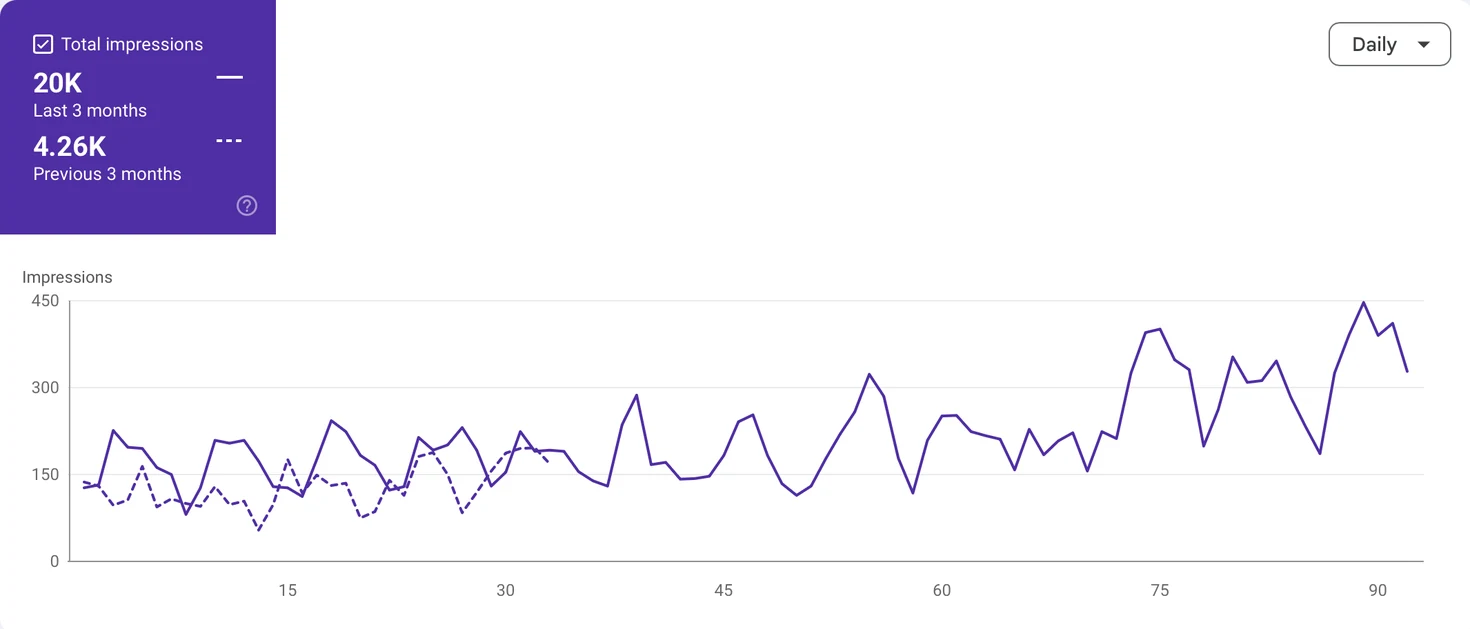
The image above is DigiStreet’s separate generative-AI visibility case, not the web-click export used for the table. It is included as named first-party work and labelled separately so the two surfaces are not blended.
The quarterly report can now be repeated with the same page groups. Preserve the export, date range and filters. The next report should explain which actions changed each group.
Questions people ask before using this guide
How many Google Search clicks did DigiStreet record in September 2026?
The internal Search Console planning export records 3,831 clicks for the month.
Which page group carries most clicks?
The ninety-day page view gives the homepage 72% of clicks and 207,015 impressions.
How did the UGC page perform?
The stated ninety-day view records 6,318 impressions and 97 clicks.
What does the blog figure show?
The export records 346 blog URLs earning 229 clicks over ninety days.
Why are the periods kept separate?
A calendar month and a rolling ninety-day view answer different questions and cannot be added safely.
Where did these figures come from?
They come from DigiStreet’s internal Search Console planning export retained with this report.
References
- DigiStreet Media, internal Search Console planning export, September and rolling 90-day views, accessed 4 October 2026
- Google Search Central, Using Search Console and Google Analytics data, accessed 4 October 2026
- DigiStreet Media, GEO case study for DigiStreet Media, 2026
Put the next decision on one page
Bring the URL, the evidence you already have and the business action that matters. We will tell you what should be checked first.